
Quotes Overview
What is a quote?
Section titled “What is a quote?”A quote (or estimate) is what you send to a customer so they can see the price and scope of work before you start. In brix, a quote is built from:
- Services: The jobs you’re doing (e.g. install AC, repair pipe), from your Services list or adhocs.
- Materials: Parts and supplies from your Materials list (and optionally Vendors).
- Labour: Time and cost for the work, calculated from your book’s labour rules.
- Equipments/assets: If your company uses them, equipment or asset lines from Equipments and Assets.
You can offer the customer one or more quote options (e.g. standard vs premium) so they can choose what fits their budget. Each option can have its own set of lines and total.
Quote requests
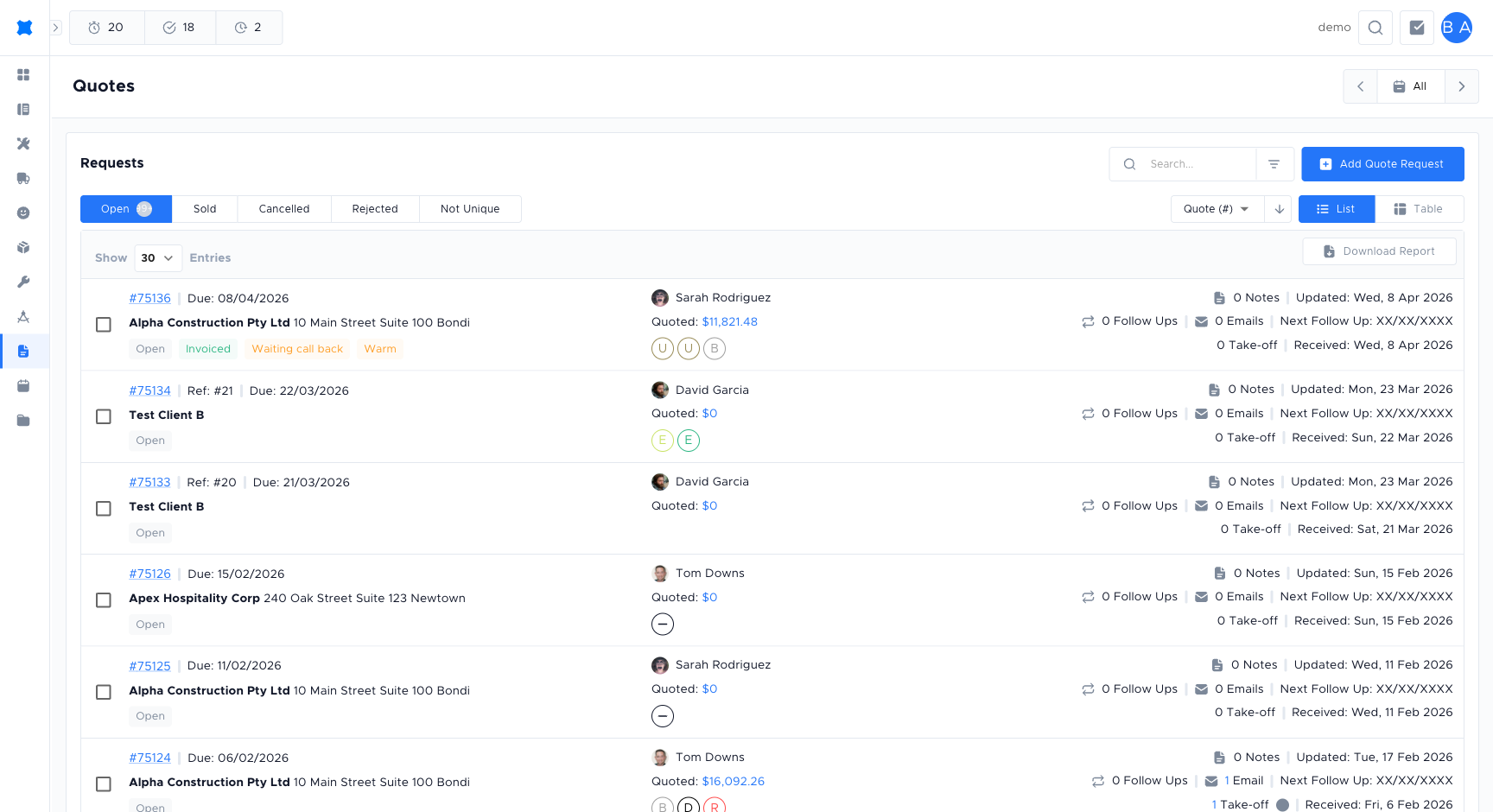
Section titled “Quote requests”When a quote is created or a customer is in the pipeline, it appears as a quote request in the system. The quote request is the container: it holds the client, job info, status, follow-ups, and one or more quote options. From the Quotes area you can:
- See a list of all quote requests: Quote Requests.
- Open one to view details, edit the quote, or send it: Creating and Sending Quotes.
- Use filters to find requests by date, status, or customer.
- Track performance: Score Card and Wallboard.
Typical workflow
Section titled “Typical workflow”- Create or receive a quote request: Either from a job board, dispatching tool, or by creating one in brix and linking a client.
- Build the quote: Add services, materials, labour (and equipments if used); create multiple options if needed.
- Send the quote: Use Send to customer so the client gets a link to view (and, if enabled, approve) the quote.
- Follow up: Use Follow-ups to schedule callbacks and log touchpoints.
- Track outcome: Update status when the customer approves, declines, or you close the request. The Scorecard reflects this for you and your team.
Closing a quote request
Section titled “Closing a quote request”Frequently asked questions
Section titled “Frequently asked questions”What is the difference between a quote request and a quote?
A quote request is the container: it holds the client, dates, status, and follow-ups. A quote is the pricing and services within it. One quote request can have multiple quote options.
Why does my quote request show “Not Unique”?
A request marked Not Unique is a duplicate and is excluded from conversion-rate calculations. This prevents duplicates from inflating your stats.
Can I create a quote request without a client?
It depends on your workspace settings. Most workflows require a linked client. If the client is new, add them first from Clients.
How do multiple quote options work?
You can add several options (e.g. Basic and Premium) to one request. The customer sees all options in the link you send them and can choose one.
Where do I find the quote a customer approved?
Open the quote request. The approved option is shown with an “Approved” badge. Use the Status filter on the Quotes list to show only Approved requests.
Things to check
Section titled “Things to check”Quote request list looks empty
Filters may be hiding results. Clear all filters (date range, status, search) and try again.
Cannot find a quote request you created
Check whether it was archived. Use the status filter to include Closed or Archived requests in your view.
Status is not updating after the customer approves
If the customer approved via the sent link, the status should update automatically. If it did not, open the request and manually change the status to Approved.