
Services
What are services?
Section titled “What are services?”Services are the types of work you can add to a quote, for example “Install split system”, “Repair hot water unit”, or “Electrical safety check”. Each service has a name, description, and price (or pricing rule). When you add a service to a quote, brix uses that price along with your book’s markup and labour rules to calculate the line total.
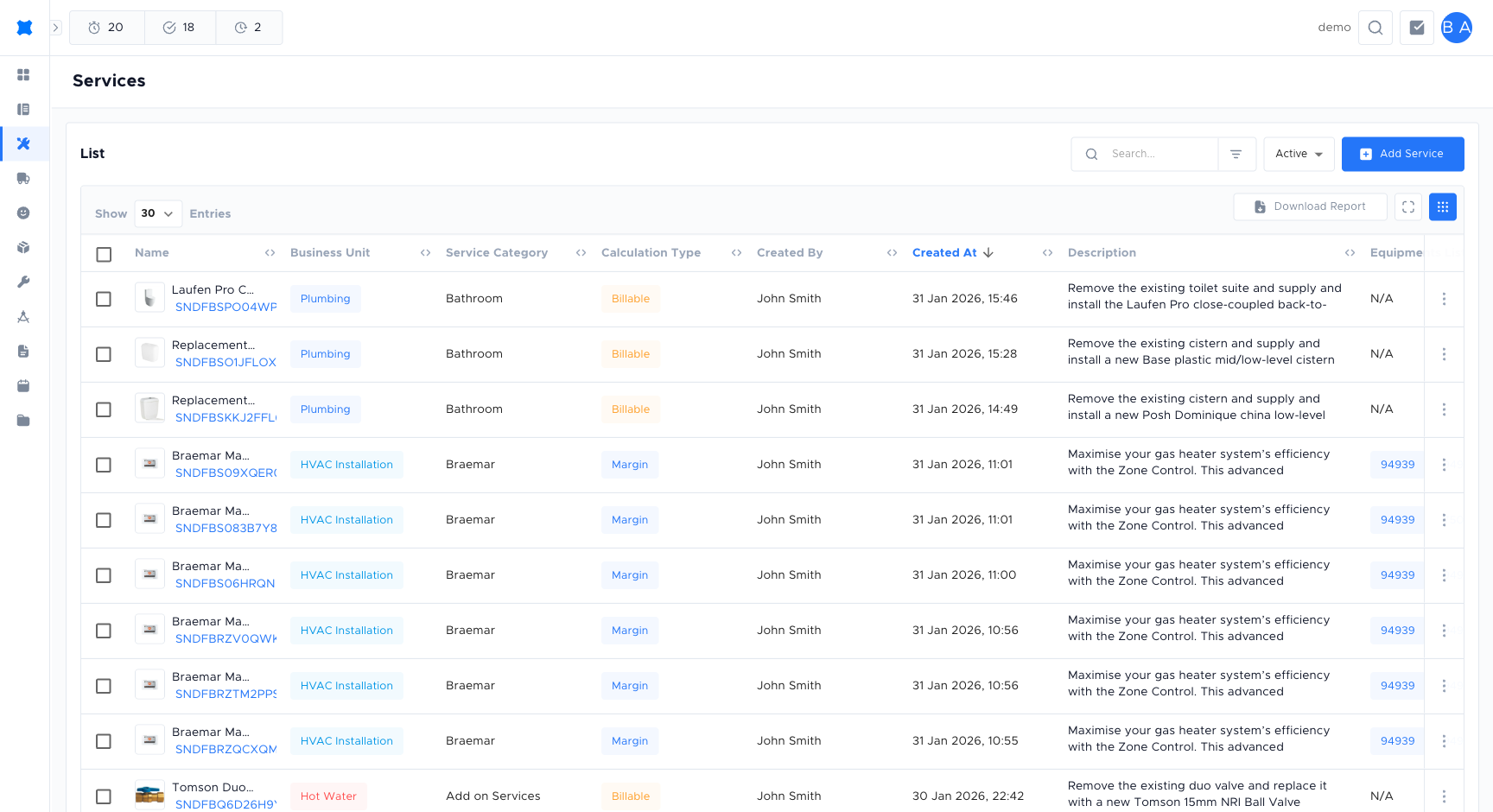
Where to find them
Section titled “Where to find them”Click Services in the sidebar. You will see the list of services available to add to quotes.
Adding a service
Section titled “Adding a service”-
Click Services in the sidebar.
-
Click Add Service.
-
Enter the service name, description, and rate or pricing rule.
-
Set the status to Active to make it available in quotes.
-
Click Save.
Service statuses
Section titled “Service statuses”| Status | Meaning |
|---|---|
| Active | The service is available to add to quotes in the quote builder. |
| Inactive | The service is hidden from the quote builder but not deleted. Existing quotes that include this service are not affected. |
Viewing and editing a service
Section titled “Viewing and editing a service”Click a service in the list to open its detail. You will see the name, description, price or pricing rule, and labour settings. Click Edit to change these if your role allows. Changes apply to future quotes. Existing quote lines keep the values they were created with.
Adhoc services
Section titled “Adhoc services”Adhocs are one-off or custom services that are not in the main list. Use them when you need to add a line to a quote that does not match a standard service, for example a special job with a custom description and price. Your admin may control who can create adhoc services.
When adding an adhoc to a quote, you enter a description (for example “Custom ductwork modification”) and a price or quantity times rate. Adhoc services do not appear in the main Services list. They exist only on the quote.
Catalogues
Section titled “Catalogues”Catalogues are sets of prebuilt services brix provides as a starting point, for example a standard set of HVAC, electrical, or plumbing services. Instead of building every service from scratch, you can download services from a catalogue into your own pricebook and then adjust pricing, labour, and descriptions to suit your business.
Where to find catalogues
Section titled “Where to find catalogues”In the sidebar, click Services → Catalogues. You will see a browser with:
- A Business unit picker: choose the book the services should download into (for example HVAC, Electrical, Plumbing).
- A Service category and optional Sub-category filter.
- A search box to find services by name.
- Five tabs that show what is in your pricebook for the selected category:
| Tab | What it shows |
|---|---|
| Available to download | Services in the catalogue that are not yet in your pricebook. |
| Updates available | Services you have downloaded that brix has since updated. Pull the latest version in if you want it. |
| Downloaded | Services already in your pricebook from this catalogue. |
| Downloading | Services currently being added to your pricebook (a one-time queue while the system copies them in). |
| Failed to download | Services that could not be downloaded. Retry from this tab. |
Downloading services from a catalogue
Section titled “Downloading services from a catalogue”-
Open Services → Catalogues.
-
Pick the Business unit (book) where the services should land. Catalogues are organised per business unit, so make sure the right book is selected first.
-
Choose a Service category (for example “Air conditioning installation”) and, if needed, a Sub-category to narrow the list.
-
On the Available to download tab, find the services you want. Use the search box if the list is long.
-
To download one service, click the Download action on its row.
To download many at once, tick the checkboxes for the services you want and use the Download selected action at the top of the table.
-
brix queues the download. The services move to the Downloading tab while they are being added, then appear under Downloaded when the copy is complete. Existing services in your pricebook are not overwritten unless you explicitly choose to update them.
-
Open the new service from the Services list to review and adjust the price, labour, description, or status before using it on a quote.
Updating downloaded services
Section titled “Updating downloaded services”If brix changes a service in the catalogue (for example a new description or default duration), the service appears on the Updates available tab in your catalogue browser. Open the row and choose to update. brix replaces the template values on your copy while keeping your overrides where it can.
Using services in a quote
Section titled “Using services in a quote”Once a service is in your pricebook, it is available in the quote builder like any other service. You add it from the Add service picker. There is no separate “Add from catalogue” step on the quote itself.
Frequently asked questions
Section titled “Frequently asked questions”Can I change a service price after it has been added to a quote?
Yes. Edit the price on the quote line directly. This only changes that quote. It does not update the service in the catalogue.
What is the difference between an adhoc and a standard service?
A standard service lives in the catalogue and can be reused across many quotes. An adhoc is a one-off item that exists only on a single quote and does not affect the catalogue.
Can I archive a service instead of deleting it?
Set the service to Inactive to hide it from the quote builder without deleting it. The service record is retained and can be set back to Active at any time.
Things to check
Section titled “Things to check”Service not appearing in the quote builder
The service may be set to Inactive. Open the service from the list and set the status to Active.
Price is not calculating correctly on a quote
The quote line may have been added before the price was updated. Edit the line directly on the quote to use the current price.