
Materials
What are materials?
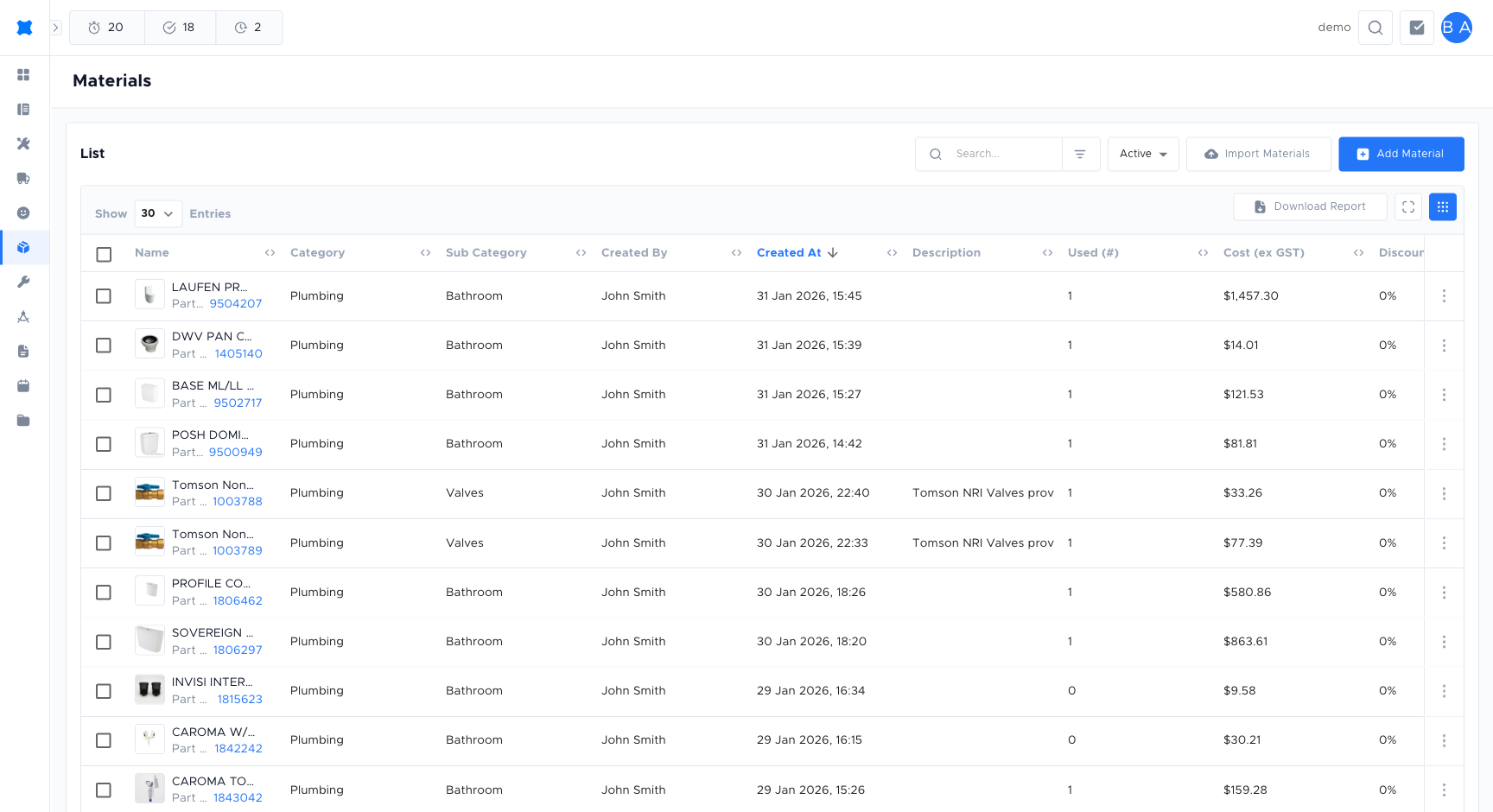
Section titled “What are materials?”Materials are parts and supplies you add to a quote: pipes, fittings, ducting, electrical components, and so on. Each material has a name, code, unit (for example each, metre), cost, and may be linked to a vendor or category. brix uses your book’s markup rules to calculate the sell price on the quote.
Where to find them
Section titled “Where to find them”Click Materials in the sidebar. You will see the list of materials available to add to quotes.
Adding a material
Section titled “Adding a material”-
Click Materials in the sidebar.
-
Click Add Material.
-
Enter the material name, code, unit of measure, and cost price.
-
Optionally assign a category and link a vendor.
-
Set the status to Active to make it available in quotes.
-
Click Save.
Material statuses
Section titled “Material statuses”| Status | Meaning |
|---|---|
| Active | The material is available to add to quotes in the quote builder. |
| Inactive | The material is hidden from the quote builder but not deleted. Existing quotes that include this material are not affected. |
Categories
Section titled “Categories”Categories group materials so you can find them quickly and filter in the list (for example “Pipe”, “Electrical”, “Ducting”). Your admin sets up categories. When adding or editing a material, you choose its category. Categories can also be used in pick lists so that your team sees a logical grouping when adding materials to a quote.
Packs are bundles of materials sold together. For example, “Standard install pack” might include several parts as one line. When you add a pack to a quote, brix may add one line for the pack or expand it into multiple material lines, depending on your configuration. Packs save time on common combinations.
Pick lists
Section titled “Pick lists”Pick lists are predefined sets of materials that appear when building a quote, for example “AC install - standard parts”. Instead of searching the full materials list, you choose a pick list and then select from its items. This keeps quoting consistent and faster. Pick lists are often configured per job type or book by your admin.
Frequently asked questions
Section titled “Frequently asked questions”Can I import materials in bulk?
Yes, brix supports bulk import of materials from a spreadsheet. Ask your admin to use the CSV Import feature in the settings area.
Can I link a material to more than one vendor?
A material can be associated with one vendor at a time. If you source the same part from multiple suppliers, create separate material records for each supplier pricing.
Will updating a material cost affect existing quotes?
No. Changes to a material’s cost apply to new quote lines only. Existing quote lines keep the values they were created with.
Things to check
Section titled “Things to check”Material not appearing in the quote builder
The material may be set to Inactive. Open the material from the list and set the status to Active.
Sell price looks incorrect on a quote
The sell price is calculated from the cost price plus your book’s markup rule. If the result is wrong, check the markup settings with your admin.