
Agreements Overview
What is an agreement?
Section titled “What is an agreement?”An agreement is a maintenance plan you have sold to a client for one service location, for example an annual service on a client’s ducted air conditioning. Each agreement has a type (the plan), a locked-in price, a commitment term, a billing cadence and a renewal date.
The Agreements overview page adds up every active agreement so you can see how much recurring revenue the plans bring in and which agreements are coming up for renewal.
Where to find it
Section titled “Where to find it”In the sidebar, click Agreements, then Overview. You need the Agreements permission to see it. If the sidebar has no Agreements entry, ask your workspace owner to switch it on for your permission group.
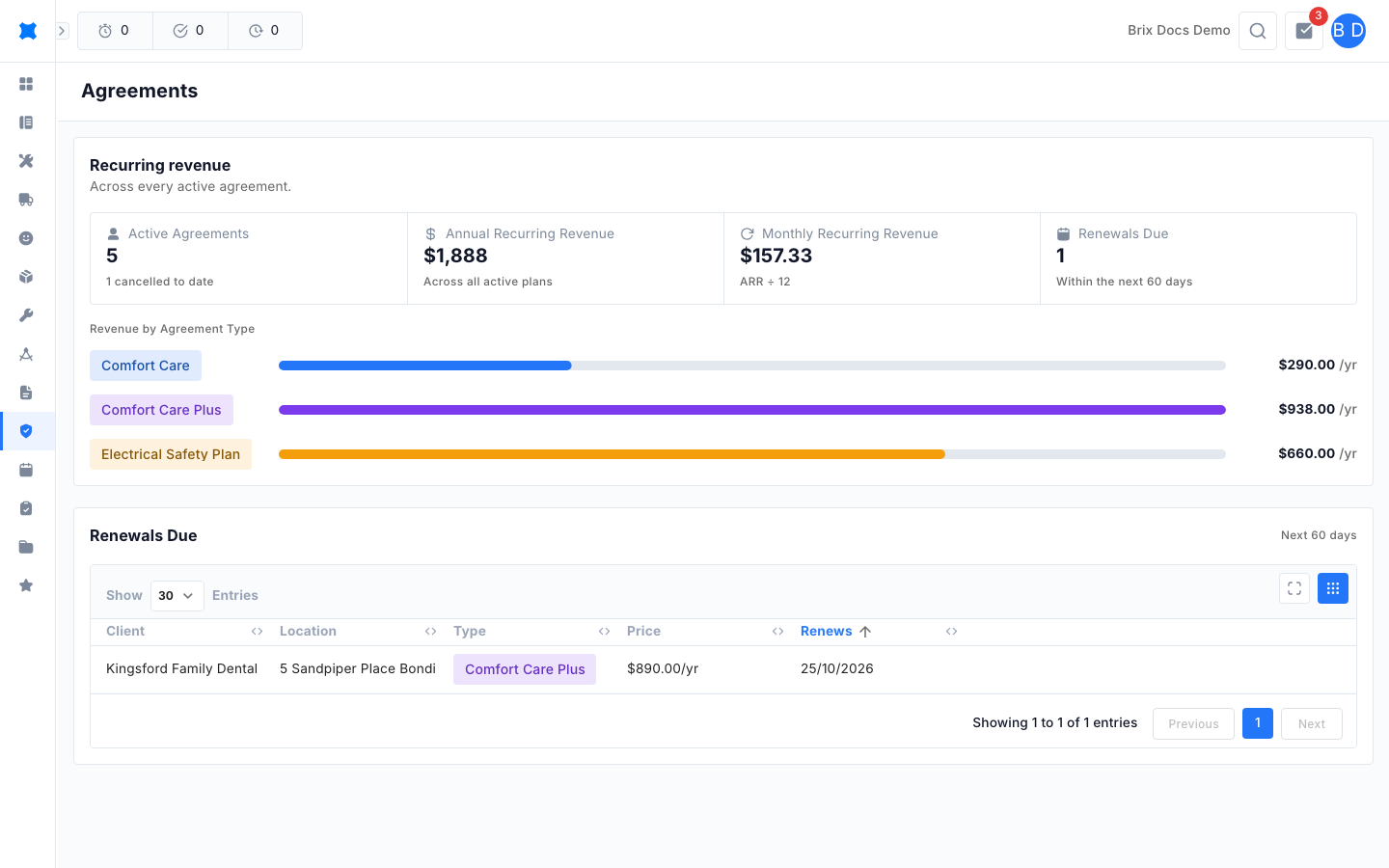
What you see here
Section titled “What you see here”The page has three parts.
Recurring revenue tiles
Section titled “Recurring revenue tiles”Four tiles sit at the top of the Recurring revenue card:
| Tile | What it shows |
|---|---|
| Active Agreements | How many agreements are currently active, with the number cancelled to date underneath. |
| Annual Recurring Revenue | The yearly value of all active agreements. |
| Monthly Recurring Revenue | The annual figure divided by 12. |
| Renewals Due | How many agreements renew within the next 60 days. |
Revenue by Agreement Type
Section titled “Revenue by Agreement Type”Under the tiles, each agreement type has a coloured bar. The bar length compares that type’s yearly revenue with your biggest type, and the dollar figure at the right shows its yearly total. If you have no active agreements yet, this area shows No active agreements yet.
Renewals due
Section titled “Renewals due”The Renewals Due table lists agreements renewing in the next 60 days, soonest first. It shows the client, location, agreement type, yearly price and renewal date. Click a column heading to change the sort.
Statuses
Section titled “Statuses”Every agreement has one of three statuses. Brix works the status out for you from the renewal date, so you never set it by hand.
| Status | Meaning |
|---|---|
| Active | The agreement is running and the renewal date is more than 60 days away. |
| Renewal Due | The renewal date is within the next 60 days. |
| Cancelled | The agreement has ended and no longer counts towards your recurring revenue. |
What happens next
Section titled “What happens next”Use the Agreements register to assign a new agreement, edit an existing one or find a client’s plan. Set up the plans you sell first under Agreement types.
Things to check
Section titled “Things to check”- A tile shows 0 or the page is empty: no agreement has been assigned yet. Assign one from the register.
- An agreement type is missing from Revenue by Agreement Type: only types with active agreements appear.
- A renewal is missing from the Renewals Due table: it only lists agreements renewing within 60 days.